Wednesday, June 9, 2010

How Much Memory Do You Need?

RAM memory


For most Americans, a fast computer is an absolute necessity. However, when they are opening so many different applications at one time, the computer is bound to slow down. RAM memory is used every time one opens an application, downloads something, plays a game, or even types a letter into a word processor. One should choose the amount of RAM they get for their computer based on the type and number of applications they will be running at one time. Many popular applications actually take up more RAM than one would think. For example, iTunes and Firefox are actually big RAM consumers.


If one is a novice or basic user, who only uses the computer to send and receive e-mail, work with word processing programs, and surf the web, 64 to 128 MB is all the user needs to keep the computer running at optimal speed. However, this changes if the user is going to be surfing many websites at a time and downloading applications. If one is downloading and using applications, it is recommended that he or she gets 256 MB of RAM.


As a professional or avid computer user it is important to have a lot of RAM to keep all applications running smoothly and efficiently. Running multiple applications at once takes up a lot of hard drive space. In addition, if one plans to play computer games or do light work with graphics, more RAM is definitely beneficial. 512 MB is recommended for users who will open several applications at the same time.


Professionals usually opt for at 1 GB of memory or more. This is because speed is important in a business. One does not have time to wait for applications to load. This can greatly reduce productivity and waste money. If working with high-end graphics, CAD or modeling software, or digital images or video, hard drive space, RAM memory is a must to keep the computer running smoothly.


In today’s market, computer memory has become quite affordable. In addition, computers and laptops with high amounts of both RAM memory and hard disk memory are inexpensive and not very hard to find in any electronics store. Of course there are other factors to look into when buying a computer. For example, the quality of the video card and sound card are important considerations for many computer gamers and graphic design professionals.


Before buying a computer or laptop, one must consider what he or she will be using the system for. This will make it much easier to decide how much RAM memory the new computer needs. Usually, a customer service representative can be very helpful in deciding how much RAM one needs. Whether buying apple memory, laptop memory, or any kind of computer memory, it is always a good idea to consult a professional!


Thursday, May 20, 2010

Understanding Computer Memory

When you are looking at computer memory, what exactly are you looking at? Well, this is a part of your computer that helps it run multiple applications, such as opening more than one page in your browser or even running several kinds of programs. You can run an anti virus program, some type of computer game, and a windows applications all at the same time. The memory of your computer is where everything is analyzed, organized. It is basically like a storage retention component of modern computers. Without this technology, your computer wouldn’t run as smoothly as it does.
laptop memory
Some people may think that with a different brand comes different memory, like an Apple computer with Apple memory. However, this is not the case. All memory is basically the same. This is why you are able to get memory to replace out-dated technology without having to replace your entire computer. Most computers that run Vista or better nowadays will come with at least 1 gigabyte of memory as this is what’s need to run Vista. With memory, like most items in the world, the more you pay out for the computer, usually the better the capabilities you will get. An example of that would be getting a 4 gigabyte or 6 gigabyte memory computer running Windows Vista 64 Bit System.

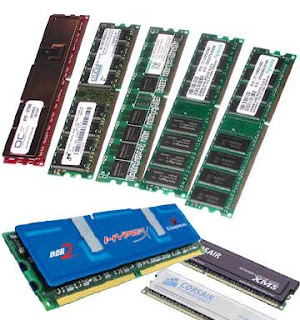
When using a desktop computer like Dell, there are different kinds of Dell memory that you can upgrade to. Most computers presently use DDR2’s in desktops and even laptops. You want to be sure that when upgrading your computer’s memory or random access memory (RAM) that you get the correct kind. This is important because desktop RAM and laptop memory are different sizes. Because notebooks are quite smaller than traditional desktops, the DDR2 RAM for a laptop is about half the size of the desktop’s memory. Note that you will not be able to use or even fit notebook memory into your desktop’s memory slot.

Picking laptop memory can be a hard choice for some people. It is most important when choice an operating system (OS). For example, if you are running Windows XP, you may not need more than 512 megabytes or 1 gigabyte of RAM. However, if you are using operating systems like Vista and Ubuntu, then it might be beneficial for you to have 2 or more gigabytes or memory as these operating systems will benefit from the extra space. This in turn will allow your computer surfing to increase in speed and you will be able to run more applications then you once were.

Monday, May 10, 2010

How to Install Computer Memory from Home

laptop memory
In the world of computers, memory is everything! Memory is one of the most important parts of a computer. In today’s society, speed has become a necessity Newer applications are very demanding on memory resources so it is important to have a lot of RAM memory and hard drive memory. Luckily, these memory upgrades are often not too expensive and can be installed at home with the proper instructions!

First of all, make sure the computer is turned off and unplugged before doing a memory installation. Once this has been done, the first step in installing computer memory is to carefully unscrew the casing. The screws are very small so it is very important to keep them in a safe place while you are working with the computer. The RAM chip is located on the motherboard. Make sure to consult the computer’s user manual in order to find the correct location of the RAM. By pressing down on the clips at the two ends of the slot holding the RAM, one can slide it right out. Insert the new RAM into the empty slot, making sure that the clips on both ends are latched securely. Before checking, screw in the casing and turn on the computer. In a Windows computer, one can check to see if the installed RAM is working correctly very easily. Simply go to “My Computer,” right click and select properties. A window will appear showing the amount of RAM that is in the computer.

Installing Apple memory is a slightly different process. Especially if one is installing Apple laptop memory. First of all, shut down the computer or laptop. This is always an important step in installing memory upgrades. Using a Phillips screwdriver, unscrew the back component, where the battery is installed. After taking out the battery, one can remove the L-shaped component where the memory cards are stored. After this step, one can replace or add memory modules. Use firm pressure to make sure the memory is installed correctly or it could fail to work in the computer. After the memory is installed, one can replace the L-shaped bracket, the battery, and the casing is returned and re-screwed. Laptops are especially delicate so it is important not to shake the computer around too much when changing out the memory. The process is different from the Windows installation in that everything is in a different location. However, it is a similar process. It is mostly a matter of learning where all the components of a computer or laptop are.

Instead of installing new memory into a computer, some opt to bring the computer in to have the memory replaced by a professional. Most companies have a warranty period and will do this for free. However, make sure the computer isn’t needed for a day or two if doing this because it might take a day or two before the company has time to do the job.

Monday, May 3, 2010

Some Quick Facts about the MacBook

MacBook memory
Almost everyone has seen the commercials with the two men stating “I’m a Mac” and “I’m a PC.” The commercials are meant to compare the two main computer distributors. The “Mac” is a younger average-looking guy who always seems to have something cool and funny to say. The “PC” is a middle-aged guy in a suit and glasses who is constantly trying to make the PC sound hip and cool. However, as this is an Apple-created commercial, the Mac always ends up sounding much better. Still, regardless of the cool commercials, more people are choosing PCs for their home computers and laptops. On the other hand, Macs and MacBooks are catching up to PCs in sales and popularity. Their sleek design and reliable support have created many die-hard Mac fans. However, when buying MacBook memory, one must do a lot of research in order to find the highest quality upgrade for the best price.

MacBooks are great computers and usually have quite a bit of memory. When buying a MacBook one should make sure that it has at least 2 gigabytes of RAM computer memory and a duo core processor. One can always get memory upgrades but they are often somewhat expensive in the case of Apple computers. If it is necessary to buy extra memory for a Mac, one should not go with the cheapest option. Low quality memory can and often will cause application crashes, total machine crashes, and data corruption. However, Macs can support a lot of memory and have the potential to be extremely powerful systems. Another benefit of buying a MacBook is the battery life. They tend to have a very high battery life and it can be upgraded as well. In addition, they often have a lot of hard drive space. When it comes to Macs people rarely have to upgrade hard drive space.

Many people buy Mac computers because they are very aesthetically pleasing. They are sleek and modern looking. In addition, the interface is very nice looking. The screen resolution is often very high and looks great when playing movies. For this reason many people buy Macs in order to edit video footage and create high-quality movies and video files. Photo editing software such as Photoshop is optimized for a Mac; therefore it is easy to make high-quality images. The amount of laptop memory or computer memory one should buy depends on the kinds of programs he or she will be running on the computer.

Macs and PCs can be compared, but they should really be treated as two completely different systems with different features. There is a vast multitude about these systems on the internet and doing research about them can help one decide which system is right for each individual.

Monday, April 26, 2010

Memory: To Upgrade or Not to Upgrade

memory upgrade
Many people have problems with the speed of their desktop or laptop computer. Today’s computer users tend to open up several applications at work. Whether in the workplace or at home, the ability to multitask is very important to a computer user. For example, if a person opens up a web browser, a computer game, a chat platform such as AIM, and a music player at one time, it often leads to the computer performing very slowly or even freezing up in some cases. This can be a huge inconvenience which can often be remedied by getting a computer memory upgrade. For the purposes of this article, memory upgrade refers to “RAM memory.” Some people also buy Hard Drive memory to increase the storage space on their computer. However, RAM memory refers to the memory used for temporarily storing the data which the computer is using at a specific instance. When upgrading computer or laptop memory, it is important to shop around and do research. RAM memory can be expensive and it is important to research the best upgrade for each computer. It is important to make sure that the technology of the memory is in sync with the computer.

Not only can increasing the RAM availability make it possible for the user to run many different programs at once, it also enables the computer to run more sophisticated software programs. Without the required amount of computer memory, a program will not function smoothly, if it runs at all. In addition, there is a greater risk of the computer freezing up completely. When using a home computer, this can be very frustrating. On the other hand, if a computer at work does not have enough RAM, it can greatly slow down productivity. The amount of money the extra computer memory would cost can pale in comparison to the loss of productivity a slow computer can cause.

Laptop memory is often more difficult to upgrade than desktop memory. Laptops are generally more restricted in the amount of memory that can be installed into a system. Today, laptops typically run somewhat slowly with 1 GB of RAM, optimally with 2 GB of RAM, and best at 4 GB of RAM. How much an individual gets usually depends on the programs he or she plans to run on the laptop. Laptops generally have two slots available for memory modules while desktop systems have four or more. When buying a laptop, it is important to determine if it has enough RAM, or if the amount of RAM needed is installable. For many people, the portability of a laptop computer makes up for the lower memory capability.


Whether buying Apple memory, Compaq memory or Dell memory, most computer stores can offer advice on what the best memory upgrade is for each computer.

Thursday, April 15, 2010

Need More Memory?

laptop memory “I need more memory!” is something people often exclaim when their computer is going too slow. However, many of them don’t really know what they are referring to when they are speaking of computer memory. RAM and hard drive space are often both called “memory” although they are completely different.

Hard drive space is disk space on a computer used for large amounts of long-term storage. Hard drive is measured in Megabytes (MB) and Gigabytes (GB). There are 1000 MB in one GB. Whenever a file is saved, whether it is a word processor file, a music file, or a movie file, it is saved to the hard drive. Once this information is saved by the user it is magnetically encoded to the hard drive.

RAM is also often called memory and it is measured in MB. It comes in the form of computer chips which plug into the motherboard of a computer. The purpose of RAM is to provide fast storage for the computer when it is in use. For example, information in RAM is stored every time a letter is typed in a word processor. This information is not stored permanently in the hard drive but is stored temporarily until the user decides to save his or her progress. In this way RAM is extremely useful as it would be quite inconvenient to save progress after every letter typed on the keyboard.

Both RAM and Hard drive memory are important to a computer’s functioning. For example, if someone buys a computer game from a store, it will show system requirements on the box. It is always important to check these requirements as the computer will not run the program properly or at all unless it meets these standards. The RAM requirements will be less than the Hard Drive requirements because they affect the game differently. For example, The RAM requirements will specify how much memory the computer needs to have to run the program at a specific time. Let’s say someone buys a game, the computer will only need to hold the information for the specific part which the user is playing. There is no need to load any data from the second level if the user is playing the first. However, when the user advances to the second level, the game will save the first level’s progress to the hard drive. Then, from the hard drive, he or she can recover the progress from the first level later if the computer is turned off. In addition, when one downloads the game onto the computer, all the information must be on the hard drive to be used when needed.

People will often buy both types of memory to make their computer faster. There are many online stores and retailers who sell Apple memory, Dell memory, laptop memory and much more. Sometimes one must search extensively for the best deals as prices vary quite a bit depending on the computer and amount of memory.